Android · in closed testing
Split bills with friends, track your own spending
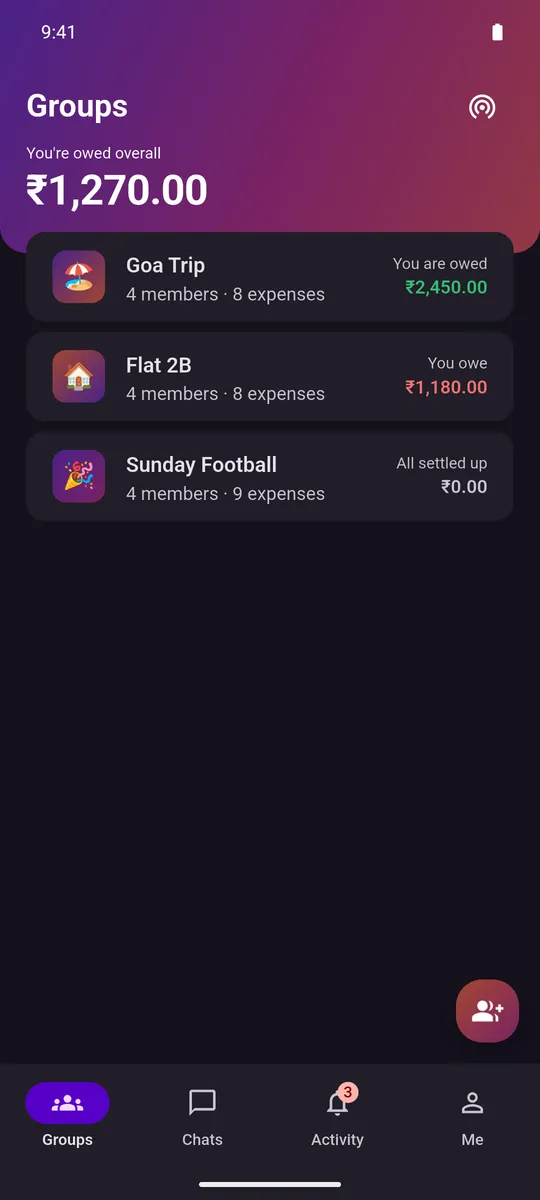
Pay for the table and only your share lands in your own spending — the rest sits in the group as money owed to you. One app for the split and for what the month actually cost you.
Free — there is no paid tier and no billing code in the app. The Android app needs your Google account on the tester list. There is no iPhone app — on an iPhone, Splitmate runs in your browser instead, with groups only.
Splitmate is in a Google Play closed test. There is no public listing, so searching the Play Store finds nothing, and Play will only install it for accounts that are on the tester list — opting in through the button above is what puts yours there. There is no iPhone app either, and none is planned; the section below is what an iPhone gets instead.
On an iPhone, or not on the tester list
Groups, in your browser
There is no iPhone app and none is planned. Open web.splitmate.quizuncle.com instead — it is groups only, no personal ledger, and the groups themselves are the same ones: the same live data, out of the same database the phone reads. Join a group in the browser and it is there on the phone the moment that phone signs in to the same Google account. Add the page to your home screen and it gets an icon and opens with no browser chrome around it. On an Apple phone that icon is also the only thing that can be notified, which the steps below walk through.
What it is, and what it cannot be. It is a second Splitmate on the same live data, and everything it opens hangs off a group you are already in — that group’s expenses and splits, its balances and settling up, its members, its own spending charts and its own thread. The personal half is what is not there: expenses you log as Just me sit in a database on the phone, no browser has a copy of that database, and so there is no personal ledger to open. Signing in with Google is required, because a browser cannot hold the per-install anonymous identity the phone uses. It is online-only — there is no offline queue, where the Android app keeps working with no connection at all. And there is no recovery code and no device transfer to set up here: the account is your Google account, so signing in with Google again is the whole of recovery.
Four destinations, along the bottom on a phone and down the side on a wider screen: Groups, Chats, Activity and Me. The Activity feed is worked out from the groups themselves rather than fetched — the phone writes its own feed into a table on the device that is never synced anywhere, so there is nothing on the server for a second client to read. That is why the two do not agree: they are not one feed seen twice, and what you have already read is remembered per browser rather than carried between them.
There is no iPhone app, so notifications need a Home Screen icon
Apple delivers a web notification to a page that has been added to the Home Screen, and to nothing else. A Safari tab never gets one and has no switch to turn on — which is why somebody who tries it in a tab concludes notifications are broken. Nothing else changes: it is the same groups-only Splitmate, with the same Google sign-in. Four steps, in this order.
- Open web.splitmate.quizuncle.com in Safari.
- Tap the Share button, then Add to Home Screen.
- Open Splitmate from the new Home Screen icon, not from Safari.
- Open the Me tab, and under Notifications press Turn on notifications. The browser asks you to allow it at that point, and never before.
The Home Screen copy keeps its own storage, so signing in with Google there is a separate sign-in from Safari’s. On Android and in a desktop browser none of this applies: an ordinary tab can be notified, and the switch is in the same place.
A notification arrives when somebody adds an expense to one of your groups, leaves one, or sends a message, and tapping it opens the group it is about. A message is the exception: tapping that one opens Splitmate rather than the thread, because the link it carries points at the front door and not at the conversation. The thread itself is there — the Chats tab lists every one you are in.
Not on the tester list?
Get an email when Splitmate is public
That did not go through. Either the address was not accepted, or too many tries have come from your connection in the last hour. Check it and send it again.
Splitmate can only be installed through the closed test right now. Leave an address here and you will hear from us when that changes.
How it works
Three steps, and only the middle one repeats
Make a group
Name it, pick the currency it counts in, add the people who were there. Share the invite code and they join the same live group — no signup for them either, and nothing to accept by email.
Add what you spent
Amount, description, date, category. One chip says whether it was just you or a group, and a second says how the group share works out: Equal, Amounts, % or Shares, across whoever was actually there.
Settle in fewer payments
Splitmate works out who should pay whom so a tangle of balances clears in as few transfers as it can. You pay however you already do; Splitmate records that it happened, with the method you used — Cash, UPI or Other.
Why it exists
Your share, in your own spending, without typing it twice
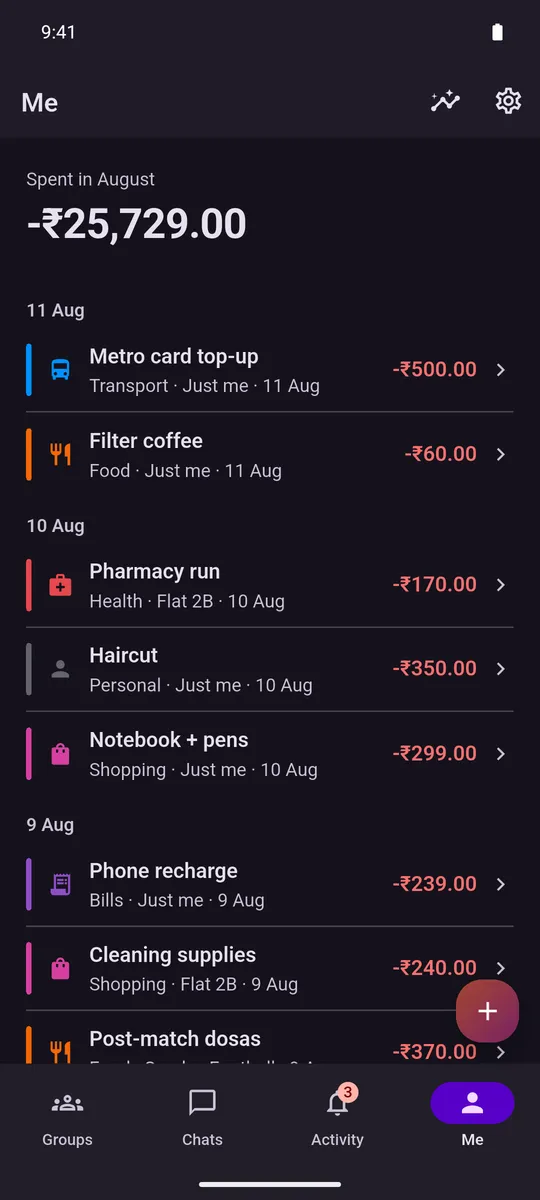
A bill splitter tells you what the group owes. It cannot tell you what your month cost, because the round you fronted is sitting in it as one big number that was never yours. Splitmate mirrors your share — and only your share — into the Me tab as you go.
Pay ₹3,000 for three people and your own spending goes up by ₹1,000, not ₹3,000. The other ₹2,000 stays in the group as money owed to you.
What it does
Six things worth knowing
One ledger, group and solo
Your share of a group expense turns up in your own spending automatically — your share only, never the whole bill you fronted. It is the reason Splitmate exists: the Me tab already knows about the dinner you split on Tuesday, without you entering it twice.
Split it the way it actually happened
The amount comes first, entered on your phone’s own keyboard rather than one Splitmate draws — description, date, an optional note and a category follow it. Pick a date after today and Splitmate refuses it, both in the date picker and again if one slips through some other way.
Settle up in fewer payments
Splitmate works out who should pay whom so a tangle of balances clears in as few transfers as it can, then records the payment you actually made. It never moves money — and when the last balance reaches zero, the group throws confetti.
A deadline you cannot quietly delete
Give a group a settlement date, an amount you are willing to be owed, or both, and anyone still short gets reminded. Then, for them, the settings lock.
Talk about it where the bill is
A thread for every group, and only groups: there are no one-to-one messages in Splitmate, so the only way anybody reaches you is a group you both joined. There is no user directory and nothing to search.
Charts & export
One screen off the Me tab, for the month you are looking at or any range you pick, filtered to just you, to all groups, or to one of them.
No account, and nothing watching. No signup, no email, no password, no phone number, and no directory anyone can look you up in. Zero analytics, zero crash reporting, zero ads and no paid tier — none of it is in the app's dependency list at all. Expenses you log as Just me never leave the phone; a group is the part that syncs, because everyone in it has to see the same numbers. The web client is the one exception to the first line: signing in with Google is required in the browser. What is stored, and where
Questions
Before you opt in
How do I get Splitmate?
Splitmate is in a Google Play closed test, so there is no public store listing to search for and nothing to download from this site. You get in through the closed-test opt-in link, which is the button at the top of this page. Once you have opted in, Play installs and updates the app the same way it does any other. That is the Android app, and it is the only one Play has: there is no iPhone or iPad app, and none is planned. The next answer is what to do instead.
There is no iPhone app — can I still use Splitmate?
Yes, in a browser — though there is no iPhone app and none is planned, so it is a different thing rather than the same one. The web client is at web.splitmate.quizuncle.com, and it works on an iPhone today: Google sign-in on iOS Safari is the way in. It is groups only, and that is a statement about what it can reach rather than a list of screens it is missing: everything you can open hangs off a group you are already in — its expenses and splits, its balances, settling up, its members, its own spending charts and its own chat. The personal half is what is not there. Expenses you log as Just me sit in a database on the phone, no browser has a copy of that database, and so there is no personal ledger to open. Signing in with Google is required, because a browser cannot hold the anonymous install identity the Android app uses. Chat in the browser has no outbox, so a message that fails to send comes back into the box for you to try again rather than waiting to go later. It is online-only, with no offline queue, where the app on the phone keeps working with no connection at all. Everything else is shared: a group you join in the browser is the same group on the phone, the moment that phone is signed in to the same Google account. There are no recovery codes and no device transfer to set up, because the account is your Google account and signing in again is the whole of it. The one thing that does not travel is the Activity feed: the phone keeps its own in a table on the device that is never synced, so a second client has nothing to fetch and works out its own from your groups instead — which is why what you have already read on one of them does not carry to the other. Add the page to your home screen and it gets its own icon and opens with no browser chrome around it. That is as close to an app as it gets, and there is no iPhone app to install instead. It is also the only way to be notified about anything on an iPhone, which the next answer walks through step by step.
There is no iPhone app — why am I not getting notifications on my iPhone?
Because on an iPhone a notification has nowhere to arrive until Splitmate is sitting on your Home Screen. There is no iPhone app, so Splitmate runs in a browser there, groups only — and Apple delivers a web notification to a page that has been added to the Home Screen and to nothing else. A Safari tab never gets one, and has no switch to turn on. So, in this order: open web.splitmate.quizuncle.com in Safari; tap the Share button and choose Add to Home Screen; open Splitmate from the new Home Screen icon rather than from Safari; then open the Me tab and, under Notifications, press Turn on notifications. The browser asks you to allow it at that point and never before — nothing prompts you when the page loads. Expect one thing on the way: the Home Screen copy keeps its own storage, so signing in with Google there is a separate sign-in from the one in Safari, and it is groups only in exactly the same way. On Android, and in a desktop browser, none of that applies: an ordinary tab can be notified, and the switch is in the same place. What arrives is a notification when somebody adds an expense to one of your groups, leaves one, or sends a message, and tapping it opens the group it is about. A message is the exception — tapping that one opens Splitmate rather than the conversation, because the link it carries points at the front door and not at the thread. The thread itself is there: the Chats tab lists every one you are in.
What do I see the first time I open Splitmate?
A choice of five ways in. Continue with Google takes your name and profile picture from your Google account — skipping straight to picking a currency when it can — and you can replace the picture later from your profile; Just use a name skips Google and asks for a name yourself. Underneath those, if you have used Splitmate before, three more rows bring your groups back: Restore with Google, Enter a recovery code, or Scan from your old phone. Every page after the first has a Back button, so a wrong tap costs nothing.
Is Splitmate free?
Yes, and there is nothing to unlock later. The app contains no billing code at all, so there is no paid tier it could sell you even if we wanted one, and no way for it to take a payment. It carries no advertising either, and no ad SDK of any kind.
Do I need an account?
Not for the Android app. There is no signup, no email address, no password and no phone number, and there is no user directory, so nobody can look you up or find you by name. Splitmate does create an anonymous Firebase identity on first launch, because the server needs something to check when it decides which groups your device may read, but nothing about you is attached to it. Signing in with Google is optional there and does exactly one thing: it ties that identity to your Google account so your groups and chats come back after a reinstall. The web client is the exception, and the only one: signing in with Google is required in the browser, because there is no install for an anonymous identity to belong to.
Does Splitmate work offline?
The app puts it in six words: works offline, groups sync to the cloud. Your personal ledger, and any group you have already synced, stay readable and editable with no connection at all, because everything is written to a database on the phone first. Creating a group, joining one, chat and push notifications are the parts that need the network, and they will wait until you have it. None of that carries over to the browser: the web client is online-only, with no offline queue, so it needs a connection for everything it does.
What actually gets uploaded?
Groups, and only groups. When you create or join one, its expenses, its member names and profile pictures, its settlements and its chat thread sync to a Google Realtime Database in Singapore, along with one push token for your device. Expenses you log as Just me never leave the phone: there is no cloud copy of them, no backup, and no code path in the app that would upload one. Splitmate has no analytics, no crash reporting and no advertising SDK, so nothing about how you use it is collected at all.
Are my chat messages private?
Not in the way a secure messenger means it, and this is worth reading twice. Messages travel over an encrypted connection and sit behind server-side rules that decide who is allowed to open a thread, but they are stored as ordinary text, which means we could read them if we looked. They are not end-to-end encrypted. The push notification a new message triggers carries the message text in its body as well, so it passes through Google’s notification service on its way to whatever the other person has signed in on. Treat a Splitmate chat the way you would treat an ordinary group chat, and not the way you would treat a private one.
Can Splitmate pay someone for me?
No. Splitmate never moves money. Settling up records a row saying that a payment happened: who paid whom, how much, and whether the method was Cash, UPI or Other. Nothing is transferred, nothing is charged, there is no card on file and there is no connection to your bank. The actual paying happens wherever you already do it. The Remind button works the same way, one step earlier: it writes a message and hands it to your Android share sheet, so you send it from WhatsApp or SMS yourself. Splitmate never sends anything itself.
How do I keep track of what is happening in a group?
Two ways. The Activity tab is one feed across every group at once, not a screen inside any single group — expenses, settlements, chat messages and membership changes, newest first, grouped by month and then by which group each one belongs to. A row about money renders as a tinted card with a category icon and the amount; a chat message or someone joining or leaving is a plain line with neither. Filter by type, category or person, in any combination, and tap a row to jump straight to the group or thread it came from. Separately, Splitmate pushes a notification the moment someone adds an expense — who added it and how much, for instance "Meera added Scooter Rental" with "₹1,200.00 in Goa Trip" underneath — and on the phone, tapping it opens that expense directly, not just the group.
How do reminders work?
You can give a group a settlement deadline, an amount you are willing to be owed before you want nudging, or both. Anyone who is still short then gets a reminder on their own phone: a local Android notification the app schedules itself, not a message anyone sends them. You pick the cadence, which is every four hours, daily, every two days, weekly, or a number of hours you choose with a floor of four. Nothing arrives between ten at night and eight in the morning. The Remind button on a settle-up is a separate thing entirely: it composes a message and opens your share sheet, and whether it ever gets sent is up to you.
Why can I not turn a reminder off?
Because turning it off would be the loophole. The settlement settings go read-only for you once two things are true at the same time: you owe money in that group, and a trigger is already live, meaning either the deadline has passed or what you owe is over the limit that was set. Raising a threshold is exactly as easy as deleting a deadline, so both arms lock together or neither does. While it is locked the sheet shows what you owe and a way through to the balances, and nothing else. Settle up, or drop back under the limit, and it is an ordinary editable form again. Everyone else in the group can still edit it; the lock is only ever on the person who owes.
Can one group use more than one currency?
No. A group has a single currency, chosen when it is created. Splitmate carries no exchange rates and does no conversion of any kind, and it never fetches a rate from anywhere. That has one visible consequence worth knowing about: the running total across the top of the Groups tab only appears when every one of your groups happens to use the same currency, and when they do not it shows how many groups you have instead. Adding unlike amounts together would produce a confident number that means nothing, so it does not. You can still choose from over 40 currencies; you just choose one per group.
Can I choose which group opens first, or turn off the animations?
Both, and they are separate settings. Open this group at startup, on a group’s own menu, pins that one group so Splitmate lands straight on it every time you launch the app; leave nothing pinned and it reopens on whichever tab you last had open instead. Motion is unrelated: Settings → Appearance → Motion offers System default, Reduce motion or Always animate, and it applies on top of — not only when — your phone’s own Reduce motion setting is on.
Who can see my group?
Every member of the group, and anyone holding its invite code. The code is the permission: that is what makes joining a group as simple as scanning a QR, and it is also why the code is worth treating like a door key and only handing to people you actually want in. Removing someone stops them appearing in balances and stops them being included in new splits. It does not reach into their phone, so the device they already joined on keeps the copy it has until they leave the group themselves.
How do I move Splitmate to a new phone?
Settings has a Backup & restore section for exactly this, with two ways to prepare: link your Google account, or set up a recovery code and keep it somewhere safe. Either one works later from the new phone’s own onboarding screen, under Restore with Google or Enter a recovery code. With both phones in hand at once, Move to a new phone is quicker: it shows a one-time code good for ten minutes, and the new phone reads it under Scan from your old phone. Whichever route you take, only your groups and chats come back — expenses you logged as Just me never left the old phone, so there is nothing to restore them from.
What happens if I uninstall the app?
Everything held on the phone goes with it, and that includes the expenses you logged as Just me, which exist nowhere else. Uninstalling is how you delete those, and it cannot be undone. Groups behave differently, because they live on the server too: the other members keep the group, its expenses and its chat exactly as they were. If you had linked Google or set up a recovery code before uninstalling, reinstalling and using either one brings your groups and chats back, though your personal ledger does not, because it was never sent anywhere to come back from. Having your name, profile picture and messages taken off the server for a group you were in is a separate request, and the data deletion page explains how to make it.
Get in while it is a closed test
Free, Android, no account. Opting in puts your Google account on the tester list, and Play installs it from there like anything else.